
ServiceNow CSA Exam Preparation: Blueprint, PDI Drills and Practice Tests
Your first ticket as a new ServiceNow administrator reads: make the Business justification field mandatory on change requests, but only for the CAB approvers group. That one request is the ServiceNow CSA exam in miniature. To pass, learn the six blueprint domains, practise tasks like this on a free Personal Developer Instance, and use timed practice tests to find which domain still costs you marks.

The ticket looks like a five-minute job. It is not, and the reasons why are exactly what the Certified System Administrator exam checks. This guide works through that ticket, sets out the exam facts and the blueprint weights, explains what an administrator really configures in each domain, and then shows how to turn a developer instance and a set of practice tests into a preparation routine that measures progress instead of guessing at it.
Why is a group-only mandatory field harder than it looks?
A beginner opens the form, right-clicks the field label, chooses Configure Dictionary and ticks Mandatory. The field is now mandatory for everyone, on every form and every view, which is not what the ticket asked for. Worse, the change sits on the dictionary entry, so it also affects every table that extends the one being edited unless someone adds a dictionary override. The exam likes this trap because the option looks right and is close to right.
The better answer takes three pieces. The form needs to know whether the current user belongs to the group, and that fact lives on the server. A display business rule runs before the form is sent to the browser, so it can check the membership with gs.getUser().isMemberOf() and store the answer in g_scratchpad. On the client side, an onLoad client script, or the script section of a UI policy, then reads that flag and calls g_form.setMandatory() for the one field.
The third piece is the one most candidates forget. A UI policy and a client script only act on the form. A list edit, an import or a web service call never loads the form, so none of them sees the rule. If the requirement must hold everywhere, a server-side check has to back it up: a before business rule that stops the update when the field is empty and the user is in the group. A data policy enforces mandatory fields on the server too, but it has no built-in way to test group membership, which is why the business rule is the right tool here.
What the ticket tells you about the exam
Nearly every CSA scenario has this shape. Several answers would change something, and only one changes the right thing in the right place. To answer well you need to know, for each tool, three facts: where it runs (browser or server), when it runs (form load, field change, before or after a database write), and how wide its effect is (one form view, one table, every child table). Candidates who carry that three-part map into the exam read the options differently, because they can rule out the ones that run in the wrong place before weighing the rest.
Keep that ticket in mind. It returns later as the first drill on the developer instance, and it is a good test of whether a practice question has been understood or merely remembered.
What are the CSA exam facts before you book?
The Certified System Administrator credential is ServiceNow's entry-level platform certification for the people who configure and maintain an instance. The figures below are the ones ProcessExam's records hold for the current mainline exam:
| Exam detail | ServiceNow CSA |
|---|---|
| Exam name | ServiceNow Certified System Administrator |
| Exam code | CSA |
| Vendor | ServiceNow |
| Number of questions | 60 |
| Exam duration | 90 Minutes |
| Exam fee | USD $300 |
| Passing score | Pass / Fail |
| Format | Multiple Choice Questions |
| Scheduling | Pearson VUE |
Sixty questions in ninety minutes gives you an average of ninety seconds each. That is enough for a careful read, but not for rereading every scenario, so pacing matters more than most candidates expect. Some questions ask for more than one answer and say how many to pick; read that instruction before the options, because a correct pair with one choice missing earns nothing.
ServiceNow reports the result as Pass or Fail and does not publish a numeric pass mark, so any percentage you see quoted on a forum is somebody's estimate. Registration starts in your ServiceNow University account, which is also where the exam voucher and any training ServiceNow asks you to complete first will appear, and the sitting itself is scheduled with Pearson VUE. ServiceNow revises the exam as the platform changes, so read the CSA mainline exam blueprint on ServiceNow University before you pick a date and confirm that the domain list matches the one you studied.
How is the CSA blueprint weighted across its six domains?
The mainline blueprint splits the exam into six domains. The weights are uneven, and the heaviest domain alone accounts for almost a third of the paper:
| Blueprint domain | Weight | Topics inside it |
|---|---|---|
| Platform Overview and Navigation | 7% | Platform capabilities and services, the ServiceNow instance, Next Experience Unified Navigation |
| Instance Configuration | 10% | Installing applications and plugins, personalizing and customizing the instance, common user interfaces |
| Configuring Applications for Collaboration | 20% | Lists, filters and tags, list and form anatomy, form configuration and templates, task management, Visual Task Boards, dashboards and Platform Analytics, notifications |
| Self Service & Automation | 20% | Knowledge Management, Service Catalog, Workflow Studio, Virtual Agent |
| Database Management and Platform Security | 30% | Data schema, application and access control, importing data, CMDB and CSDM, Security Center, Shared Responsibility Model |
| Data Migration and Integration | 13% | UI policies, business rules, system update sets, scripting in ServiceNow |
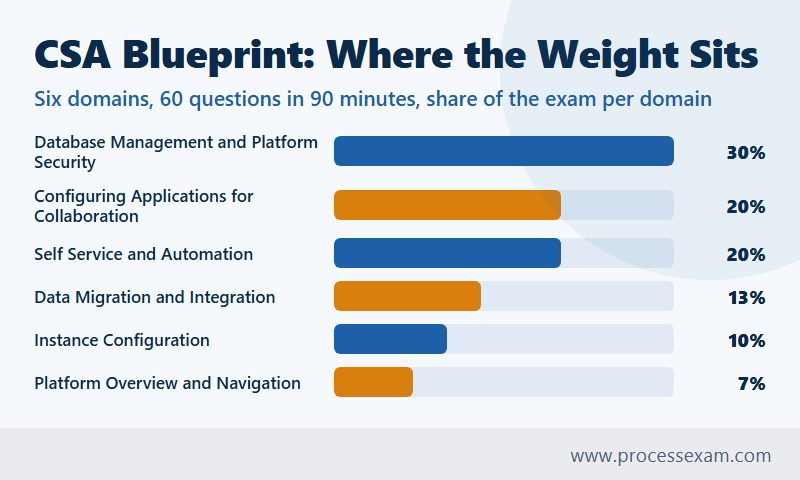
Turn the weights into questions and the priorities are plain. Thirty percent of sixty is roughly eighteen questions on data schema, access control, imports and security. The two twenty-percent domains are worth about twelve questions each. Navigation, the area many candidates spend their first week on because it feels like the natural starting point, is worth only four or five. None of this means the small domains can be skipped, since a handful of lost marks decides a close result, but it does tell you where an extra study hour pays back most.
Two domains also lean on each other more than the table suggests. Data Migration and Integration covers UI policies and business rules, and those are exactly the tools behind the first ticket, while the access control topics in the heaviest domain decide who can see the field at all. The full objective list for each domain is set out on our ServiceNow CSA exam syllabus page, which is worth keeping open beside the blueprint while you plan.
What does an administrator actually configure in each domain?
The blueprint names topics; the exam asks what you would do with them. The notes below describe the configuration work behind each domain, which is the level at which the questions are written.
Platform Overview and Navigation (7%)
This domain checks that you can find your way round an instance quickly. Expect questions on the Next Experience Unified Navigation menus (All, Favorites, History and Workspaces), on filtering the application navigator, and on the difference between a module that opens a list and one that opens a form. Knowing that typing a table name followed by .list or .do into the navigator opens that table directly saves time in the exam and at work.
Instance Configuration (10%)
Here the questions turn on the difference between personalizing and configuring. A user who changes the columns on their own list has personalized it; an administrator who changes the list layout for everybody has configured it, and only the second is captured in an update set. You should also know how applications and plugins are activated, why some plugins cannot be deactivated once installed, and which interface suits which audience: the classic platform UI and workspaces for fulfillers, portals for requesters, and the mobile apps for people away from a desk.
Configuring Applications for Collaboration (20%)
This is the domain of everyday administration. Lists and filters come first: the condition builder, saved filters, the breadcrumb trail, and tags as a lightweight way to group records. Form work covers sections, related lists, formatters, form views, and the choice between Form Layout and Form Designer. Task management rests on the Task table, which Incident, Problem, Change and many other tables extend, so fields such as Assignment group and State behave the same way across all of them.
Visual Task Boards come in three kinds, freeform, guided and flexible, and questions often ask which one suits a described team. Notifications are tested through their three parts, when to send, who will receive and what it will contain, together with the reasons a notification fails to arrive: an inactive record, a condition that never matches, or a recipient without an email address. Dashboards and Platform Analytics round out the domain at the level an administrator needs, meaning who can see a dashboard and how a report is shared.
Self Service & Automation (20%)
Knowledge Management questions ask how knowledge bases, categories and user criteria decide who can read or contribute, and how an article moves through its publishing workflow. The Service Catalog is a large share of this domain: catalog items and their variables, variable sets for questions you reuse, record producers that create a task record from a catalog-style form, order guides that bundle several items, and catalog UI policies that behave like form UI policies for variables.
Workflow Studio is where fulfilment is automated. Learn the parts of a flow (a trigger, then actions and flow logic), when to build a subflow that other flows can call, and how an approval step pauses a flow until someone responds. Virtual Agent questions stay at the level of what a conversation topic is and when a chatbot is a sensible front door for a request.
Database Management and Platform Security (30%)
The heaviest domain starts with the data schema: tables, fields, the dictionary, reference fields that point at other tables, and table extension, where a child table inherits every field of its parent. Access control is the part that separates strong candidates from the rest. An access control list rule can apply to a whole table or to one field, and a user must pass both levels to read or write a field. Inside a single rule, the required role, the condition and the script must all evaluate to true.
Importing data follows a fixed path: the source loads into an import set table, a transform map moves the rows into the target table, and coalesce fields decide whether an incoming row updates an existing record or creates a new one. The CMDB and CSDM topics are covered here from an administrator's angle, meaning what a configuration item class is and why relationships matter, rather than at implementation depth. Security Center gives a view of the instance's security settings and hardening status, and the Shared Responsibility Model sets out which controls ServiceNow runs for the platform and which ones your organisation owns, such as user access, data and custom code.
Data Migration and Integration (13%)
This domain gathers the tools that change how records behave. UI policies act in the browser, with options such as Reverse if false and On load. Business rules run on the server, before or after a database write, asynchronously, or on display. System update sets record configuration changes so they can be moved from one instance to another; they do not carry ordinary data such as incident records. Scripting questions stay at administrator depth: which kind of client script fires when (onLoad, onChange, onSubmit, onCellEdit), what a GlideRecord query does, and when a no-code option should be chosen over a script.
How do you practise the CSA blueprint on a Personal Developer Instance?
A Personal Developer Instance, usually shortened to PDI, is a free ServiceNow instance for learning. You request one through the ServiceNow Developer Program, choose a platform release and receive a working instance with admin rights and demo data. ServiceNow reclaims instances that sit unused, so log in regularly while you study and keep a note of anything you build that you would not want to lose.
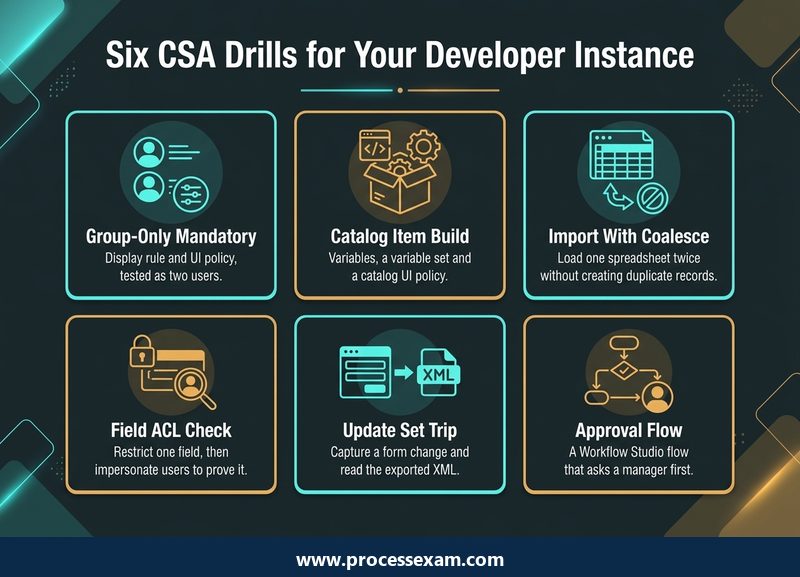
Reading about access control or coalesce gives you the vocabulary. Building them gives you the reflexes the scenario questions depend on. The six drills below cover the heaviest parts of the blueprint, and each one ends with a check you can see, so you know the drill worked rather than assuming it did.
Drill 1: the group-only mandatory field
Rebuild the first ticket. Create a group, add one test user to it, write the display business rule and the client script, and then impersonate two users, one inside the group and one outside it. The field should be mandatory for the first and optional for the second. Finish by editing the same record from a list view and notice that the rule does not fire there, which is the gap the server-side check closes.
Drill 2: a catalog item from scratch
Build a request for a new laptop with three variables, move two of them into a variable set, and add a catalog UI policy that shows a justification field only when the user picks the most expensive model. Order the item as an end user from the portal and confirm the request, requested item and catalog task records appear as expected.
Drill 3: import with coalesce
Create a small spreadsheet of users, load it through an import set, build a transform map and mark the email field as coalesce. Load the same file a second time and check that the user count has not doubled. Then change one row's name, load again, and confirm the existing record was updated rather than a new one created.
Drill 4: a field-level access control
Elevate to the security administrator role, create an ACL that makes one field readable only to a chosen role, and impersonate a user without that role. The field should vanish or turn read-only. If it does not, check whether another ACL on the same field already grants access, which is the kind of reasoning an exam scenario expects you to walk through.
Drill 5: an update set round trip
Create a new update set, make it current, change a form layout and add a UI policy. Mark the set complete, export it to XML and open the file. You will see the configuration records you changed, and you will also see that none of the test records you created along the way were captured, which answers a common exam question on sight.
Drill 6: an approval flow
In Workflow Studio, build a flow that triggers when a requested item is created, asks the requester's manager for approval and, once approved, creates a catalog task for the fulfilment group. Order the item, approve it as the manager through impersonation and follow the flow's execution details to see each step run in order.
Two sessions a week on these drills, alongside the reading, covers the practical side of more than half the blueprint. Keep the ServiceNow product documentation open while you build; it uses the same terms as the exam, and several answer options differ by a single term.
How should CSA practice tests fit into your preparation?
A practice test is a measuring tool, and it only helps if you read the measurement properly. Used at the wrong time, or reviewed carelessly, it tells you very little. Used on a schedule, it tells you which domain to study next and when you are ready to book.
Take a short diagnostic before you study
Sit a short set of questions cold, before the first reading session. The score itself does not matter. What matters is the pattern: most people find their misses cluster in two domains, and those two go to the front of the study plan instead of the order the blueprint happens to list them in.
Keep an error log tagged by domain and by tool
For every question you miss or guess, write down the blueprint domain and the tool the right answer used: UI policy, data policy, business rule, ACL, dictionary override, update set, transform map and so on. After two or three sets, the log shows whether your weakness is a whole domain or one tool that keeps turning up in different domains. A candidate who keeps missing questions about where rules run needs the three-part map from the first ticket, not another hundred questions.
Rebuild every scenario you got wrong
When a missed question describes a configuration, rebuild it on the PDI and watch what happens. It takes ten minutes, and it turns a remembered answer into an understood one. This is also the best defence against a question bank that repeats: if you can explain why each wrong option fails, a reworded version of the same scenario will not catch you out.
Rehearse the clock with full-length tests
Sit full-length tests under exam conditions, with 60 questions against a 90-minute timer and no pauses. If a question is still unresolved after two minutes, mark it and move on; the last stretch of the clock is for those. The CSA practice test on ProcessExam follows that 60-question, 90-minute format, so you can see whether your pace holds up over a full sitting and which domains your misses cluster in.
Decide when you are ready
ServiceNow publishes no pass mark, so set your own rule. A sensible one is two consecutive full-length tests on questions you have not seen before, with no domain standing out in the error log and time left over at the end. Weight the heaviest domain accordingly: a weak spot in the domain worth thirty percent is a bigger risk than the same weak spot in the one worth seven.
Which CSA mistakes cost administrators marks?
The same errors come up again and again in scenario questions. Each one has a quick fix.
- Treating the UI policy as enforcement. It controls the form only. If a rule must hold for imports, lists and integrations, a server-side option is needed as well.
- Changing the dictionary when an override was meant. A dictionary change on a parent table reaches every child table; a dictionary override changes the behaviour for one child only.
- Assuming one passing ACL is enough. A user must pass both the table-level and the field-level rule, and every part of a single rule must be true.
- Expecting update sets to move data. They carry configuration. Groups, users and task records created while testing do not travel with them.
- Forgetting coalesce. Without a coalesce field, every import inserts new records, and duplicates follow.
- Confusing personalization with configuration. A personal list layout affects one user and is not captured; a configured layout affects everyone.
- Studying in blueprint order. Navigation is listed first but worth the least; start with the domains your diagnostic says you miss.
Most of these mistakes come from knowing a tool by name without having used it. The drills in the previous section target them directly, which is why an hour on the PDI is often worth more than an hour of extra questions.
How do you keep the CSA credential current after you pass?
Passing the mainline exam is not the end of the story. ServiceNow keeps its certifications tied to the platform as it changes, and certified administrators are expected to keep up through delta exams, which are short assessments on what has changed between releases. Your ServiceNow University account shows which ones apply to you and when they are due, so check it after each platform release rather than waiting for a reminder.
The habits built while preparing make this easier. Keep your PDI, upgrade it when a new release is offered, and repeat the drills that touch a changed feature. Keep the error log too: it shows which areas you found hardest the first time, and those are the ones worth rechecking when the release notes mention them.
CSA is also the base on which ServiceNow's implementation specialist and application developer credentials build, so the domains studied here come back later in more depth. A candidate who has really configured access control, imports and flows for this exam starts those later exams with an advantage that no amount of reading can match.
Frequently Asked Questions
How many questions are on the ServiceNow CSA exam?
The ServiceNow CSA exam has 60 multiple choice questions and a time limit of 90 minutes, so you have about ninety seconds for each one. Some questions ask for more than one answer and state how many to choose, so read that instruction before looking at the options.
How much does the CSA exam cost?
The CSA exam fee is USD $300. You register through your ServiceNow University account, where any voucher you hold is applied, and the sitting is scheduled with Pearson VUE. ServiceNow can change fees, so confirm the current price in your account before you book a date.
What is the passing score for the CSA exam?
ServiceNow reports CSA results only as Pass or Fail and does not publish a numeric passing score. Percentages quoted online are estimates. A better readiness check is two consecutive full-length timed practice tests on unseen questions, with no single blueprint domain standing out in your list of missed questions.
Which CSA exam domain carries the most weight?
Database Management and Platform Security carries 30 percent of the CSA blueprint, the largest share. It covers the data schema, access control lists, importing data, CMDB and CSDM basics, Security Center and the Shared Responsibility Model. Configuring Applications for Collaboration and Self Service & Automation follow at 20 percent each.
How should I use CSA practice tests and mock exams?
Start with a short diagnostic before studying, then log every missed question by blueprint domain and by the tool the answer needed. Rebuild missed scenarios on a Personal Developer Instance, and finish with full-length tests of 60 questions in 90 minutes to check your pace and your weakest domain.
- ServiceNow System Administrator Test Questions |
- CSA Question Bank |
- ServiceNow System Administrator Book |
- System Administrator Certification Cost |
- System Administrator Certification Requirements |
- ServiceNow System Administrator Sample Questions |
- CSA Exam Questions Download |
- CSA Test Questions |
- System Administrator PDF |
- Platform and AI


