
ISTQB Usability Testing Certification: A Tester's Route Into UX Work
Many testers believe usability testing means asking a few users whether they like a screen. The ISTQB usability testing certification teaches something far more disciplined: planning moderated test sessions, rating each finding by severity, checking accessibility against WCAG, and choosing between reviews, tests and surveys. It suits Foundation Level holders who want a specialist route into UX work.
The certificate is ISTQB's Certified Tester Usability Testing, exam code CT-UT, in the Specialist stream. Its syllabus is version 1.0 from 2018, and when we checked ISTQB's CT-UT page in October 2026 that was still the only version listed, with no newer release and no retirement notice. A syllabus that has stayed stable for eight years is good news for a candidate: the ideas it tests, from ISO 9241 definitions to the System Usability Scale, are the settled core of the field rather than a trend that could shift before your exam date.

Why can software pass every functional test and still fail its users?
Functional testing asks whether the software does what the specification says. Usability evaluation asks a different question: can the people who will actually use it reach their goals without confusion, delay or frustration? The syllabus builds on the ISO 9241-210 definition, in which usability is the extent to which a system can be used by specified users to achieve specified goals with effectiveness, efficiency and satisfaction in a specified context of use. Each of the three words carries weight in the exam. Effectiveness is whether users complete the task at all, efficiency is the effort and time it costs them, and satisfaction is how they feel about the experience.
Two neighbouring ideas sit beside usability. User experience is wider: it covers a user's perceptions and responses before, during and after use, including the support desk, the delivery email and the printed manual. Accessibility is the degree to which people with the widest range of needs and abilities, including disabilities, can use the product. A banking app can be perfectly usable for a sighted 25-year-old and still exclude a screen-reader user entirely, which is why the syllabus treats the three as related but separate evaluation goals.
Chapter 2 of the syllabus turns this into risk language a project manager understands. Its typical usability risks are concrete and commercial:
- users do not buy or adopt the product because it lacks effectiveness, efficiency or satisfaction;
- users buy it, cannot make it work, and ask for their money back even though it works exactly as specified;
- users keep calling support because they do not understand how to use it;
- dissatisfied users complain to friends and on social media, eroding trust in the brand;
- staff forced to use a poor internal system lose productivity and morale;
- a poorly designed or deceptive interface creates liability through risk to health or financial loss.
User experience risks add examples such as shopping-cart abandonment, where a purchase is broken off because the app performs a function slowly or awkwardly. Accessibility risks carry a legal edge as well, which Chapter 3 picks up. For a tester, the lesson is that a defect-free build is not the same as a usable product, and that usability problems are found most cheaply early, while designs are still prototypes.
That timing point leads to one of the most tested distinctions in the syllabus. Formative evaluation, sometimes called exploratory, is qualitative and happens during design to uncover problems so they can be fixed. Summative evaluation is quantitative and happens late, shortly before or after release, to measure how usable a component or product is. Exam questions often describe a project stage and ask which kind of evaluation fits, so learn the pairing of early-qualitative and late-quantitative until it is automatic.
Who is the usability testing certificate built for, and what do you need before you sit it?
ISTQB aims the certificate at anyone in software testing who wants to deepen their usability knowledge or start a specialist career in it, and at usability engineers who want a structured view of how testing fits their work. In practice that describes three groups: functional testers who keep raising "this is confusing" comments that get closed as "works as designed"; QA leads in agile teams who are now expected to cover UX acceptance criteria; and designers or researchers who want the vocabulary that test managers and auditors use.
There is one firm entry condition: you must already hold the ISTQB Certified Tester Foundation Level certificate. ISTQB lists the business outcomes a holder should be able to deliver, and they read like a job description for a usability tester:
- explain the basic concepts of usability and usability testing;
- identify and rate the severity of usability risks and possible accessibility violations at any point in the development cycle;
- cite the relevant usability, user experience and accessibility standards and check a product against them;
- set up procedures that verify usability, user experience and accessibility goals in practice;
- design a test plan for those goals and monitor how it is carried out;
- explain the reasons, process and results of an evaluation to stakeholders who are not specialists.
Those outcomes also hint at the career value. The last one, explaining results to non-specialists, is the skill that most often separates a usability tester whose findings get fixed from one whose report gathers dust. Chapter 8 of the syllabus closes the course by summarising the three roles you may play: usability tester, moderator and note-taker.
The exam itself is short and fixed in format:
| Exam detail | CT-UT |
|---|---|
| Full name | ISTQB Certified Tester Usability Testing |
| Stream | Specialist |
| Prerequisite | ISTQB Certified Tester Foundation Level |
| Questions | 40 multiple choice |
| Duration | 60 minutes; ISTQB adds 25 percent (75 minutes in all) when you sit in a language that is not your own |
| Passing score | 26 / 40 |
| Exam fee | USD 199 |
| Syllabus | Version 1.0 (2018), still current in October 2026 |
Twenty-six out of forty is 65 percent, so you can drop fourteen questions and still pass. With 60 minutes for 40 questions you have an average of 90 seconds each, which is generous for recall questions and tight for the handful of scenario questions that ask you to analyse a project and choose an evaluation method. Bookings go through ISTQB member boards and exam providers, so confirm the final price, taxes and exam languages with the one you use.
Which syllabus chapters carry the most questions?
ISTQB publishes exactly how the 40 questions are drawn from the syllabus in its Exam Structures and Rules tables (version 1.19, August 2026). The split is uneven, and knowing it is the single most useful planning fact for this exam.
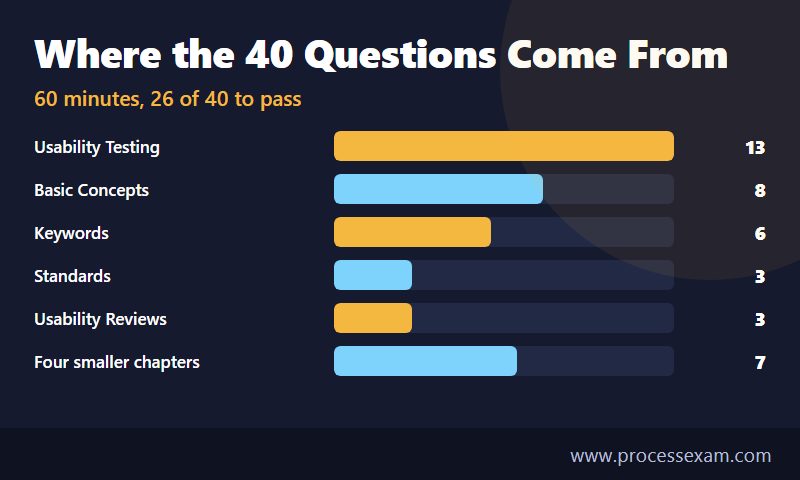
| Chapter | Study time | Questions | Cognitive levels |
|---|---|---|---|
| 1. Basic Concepts | 200 min | 8 | 8 x K2 |
| 2. Risks in Usability, UX and Accessibility | 80 min | 2 | 1 x K2, 1 x K4 |
| 3. Usability and Accessibility Standards | 105 min | 3 | 3 x K2 |
| 4. Usability Reviews | 90 min | 3 | 2 x K2, 1 x K4 |
| 5. Usability Testing | 270 min | 13 | 10 x K2, 3 x K3 |
| 6. User Surveys | 30 min | 2 | 2 x K2 |
| 7. Selecting Appropriate Methods | 40 min | 1 | 1 x K4 |
| 8. Roles and Responsibilities | 30 min | 2 | 2 x K2 |
| Keywords (glossary terms) | - | 6 | 6 x K1 |
The chart above groups the four smallest chapters, Risks, User Surveys, Roles and Selecting Methods, into one bar of seven questions; the table gives each one separately. Three patterns stand out. First, Chapter 5 alone supplies 13 questions, almost a third of the paper, and it is the only chapter with K3 (apply) questions. Second, Chapters 1 and 5 together give 21 questions, more than the 26 you need when combined with the six keyword questions. Third, the three K4 (analyse) questions are scattered across Chapters 2, 4 and 7, and they are the ones that take time because each describes a situation and asks you to judge it.
The keyword questions deserve a separate note. Each chapter of the syllabus opens with a list of terms such as context of use, formative evaluation, heuristic evaluation, think aloud usability testing, usability test script and user survey. Six questions simply ask you to recognise their definitions. They are the cheapest marks on the paper, and a candidate who skips the glossary throws them away. Our usability testing syllabus outline lists every chapter and sub-topic on one page if you want a checklist to tick off as you study.
Altogether the syllabus asks for 845 minutes of study time, a little over 14 hours of teaching. A tester who already runs exploratory sessions will find Chapters 4 and 5 familiar in spirit; someone from a design background will move quickly through Chapter 1 but should slow down for the standards and legislation in Chapter 3.
What happens in a moderated usability test, from plan to report?
Chapter 5 describes usability testing in three principal steps, and the exam expects you to place any activity in the right one:
- Prepare the usability test: create the test plan, recruit participants, write the test script, define the test tasks and pilot a session.
- Conduct the test sessions: prepare each session, brief the participant with pre-session instructions, hold a pre-session interview, moderate the session and finish with a post-session interview.
- Communicate results and findings: analyse the findings, write the usability test report and "sell" the findings, meaning convince the people who must act on them.
The test plan records the goals, the user groups, the number of planned participants, the schedule and length of each session, the name of the moderator responsible, a resource and cost estimate including incentives, and the location. The syllabus gives the goals of a usability test as checking whether usability requirements are met, uncovering problems so they can be fixed, and demonstrating convincingly to stakeholders that their product has serious usability problems. The first two apply to any evaluation method. The third is unique to usability testing, which is why a live test is the tool of choice when management doubts that usability is a problem at all.
Three roles run every session. The moderator is a neutral usability expert who conducts the session and is the only person allowed to talk to the participant. The note-taker, also a usability expert, records the important findings. Observers are stakeholders such as developers, product owners or managers who watch, usually from another room or remotely, and stay silent. The main technique is think aloud: the participant says what they are thinking while they work through the tasks, so the moderator, note-taker and observers learn both the reasoning and the vocabulary real users bring.
Location is a planning decision in its own right. Classic usability testing puts participant and moderator face to face in the same place, often a usability lab, and the syllabus weighs the pros and cons of a lab. Remote usability testing separates them and uses instant messaging, webinar or video tools. In an unmoderated test the participant works alone, which makes recruitment fast and lets a test finish within a few days, at the cost of losing the moderator's follow-up questions.
Here is how the steps look on a real task. Suppose a bank wants to know whether customers can set up a recurring transfer in its mobile app. The task in the script should state a goal, not the route: "You pay your rent of 900 on the first of every month; arrange for the app to do this automatically." It must not say "tap Payments, then Standing Orders", because that tests reading, not usability. During the session, the participant searches the Payments menu, hesitates, says aloud "I thought this would be under Transfers", and finally finds the option under a settings icon. The moderator does not help, hint or demonstrate. The note-taker records the hesitation, the quote and the time taken.
Analysis follows a set rhythm. After each session, while memories are fresh, the moderator and note-taker hold a candid discussion of what they saw. When all sessions are complete, each of them separately extracts between twenty and thirty usability findings and between five and ten positive findings. They then meet again and merge their lists into one common list of the same size. Expect exam questions on those numbers and on the order of the steps.
How should a usability finding be rated so the team fixes the right thing first?
Every finding in the report receives a classification. The syllabus lists four typical ones: a usability problem, which must carry a severity rating; a positive finding, something that works well and can be recommended; a good idea, a participant's suggestion that could significantly improve the user experience; and a functional problem, which is simply a defect and goes to the normal defect process.
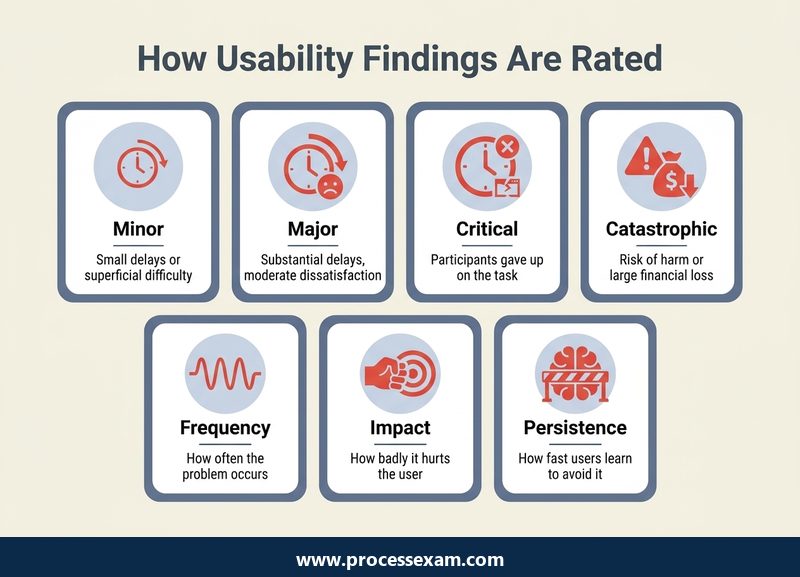
Usability problems are then rated on a four-step scale, judged from the participant's point of view and sometimes agreed with a domain expert:
| Severity | What it means |
|---|---|
| Minor | Minor dissatisfaction, noticeable delays or superficial difficulties |
| Major | Substantial delays or moderate dissatisfaction |
| Critical | Participants gave up; a showstopper, substantial dissatisfaction or minor financial damage to the user |
| Catastrophic | An existential threat: potentially life-threatening, bodily harm or substantial financial damage |
Three parameters push a rating up or down. Frequency asks how often the problem occurs. Impact asks how badly it hurts the user and the user's environment when it does. Persistence asks how quickly users learn to avoid it. Apply them to the banking example. If two of eight participants searched the wrong menu for a while but then found the standing-order screen, the problem is real but recoverable: Major is a fair rating. If five of eight gave up and said they would phone the bank instead, the rating becomes Critical, because participants abandoned the task. If a confusing date field led one participant to schedule the rent payment for the wrong year without noticing, the possible financial damage pushes the rating higher still, even though it happened only once.
The same chapter is firm about how findings are reported. A usable report is short, with a one-page executive summary, and the syllabus recommends at most twenty-five findings and twenty pages, however large the test. It should also contain positive findings, because stakeholders accept criticism more readily when the report shows the evaluators also noticed what works. Recruitment paperwork such as screeners and confirmation letters stays out of the report. Selling the findings is treated as a skill: involve stakeholders in planning, invite them to observe sessions, and present results in a positive, productive tone rather than as a list of blame.
When is a heuristic review, a survey or an accessibility check a better choice than a test?
Usability testing is powerful but not always the right tool, and Chapters 3, 4, 6 and 7 cover the alternatives. The exam's single K4 question on method selection draws on all of them.
Usability reviews
A usability review is an evaluation by people who look at the interface rather than watch users. The syllabus distinguishes informal reviews, expert usability reviews and heuristic evaluation, and gives the review a set of steps that ends with a consensus meeting: only findings the reviewers agree on go into the report, which removes comments that are one reviewer's personal taste. In a heuristic evaluation one or more reviewers, preferably experts, compare the interface with a short list of recognised rules of thumb, typically grouped in sets of about ten, and report where it breaks them. The syllabus spends 60 minutes on applying the checklist it provides. Its key warning is about direction: the heuristics must drive the evaluation. A reviewer who finds problems by intuition and only afterwards attaches a heuristic to each one has done an expert review, not a heuristic evaluation, and should not invent a private set of heuristics either.
User surveys
When the question is satisfaction, a survey is the direct measure. The syllabus names three standardised questionnaires. The System Usability Scale (SUS) has ten items, each answered on a five-point scale, and gives a global view of subjective usability. SUMI, the Software Usability Measurement Inventory, has fifty statements answered Agree, Don't Know or Disagree. WAMMI, the Website Analysis and MeasureMent Inventory, has twenty statements focused on websites, covering attractiveness, controllability, efficiency, helpfulness and learnability. All three allow benchmarking against databases of earlier results, which a home-made questionnaire cannot.
Accessibility standards
Chapter 3 gives three questions and covers the standards a tester checks against. On the usability side these include ISO 9241-110 dialogue principles, which resemble heuristics, and ISO 9241-210 on human-centred design, alongside manufacturer guidelines for platforms. On the accessibility side the syllabus works with ISO 9241-171 and the Web Content Accessibility Guidelines (WCAG) 2.0, whose three conformance levels are A, AA and AAA. The syllabus recommends adopting level AA. It also expects you to understand the general content of accessibility legislation, using the UK Equality Act 2010 and the Americans with Disabilities Act as its examples. You do not need to memorise every WCAG success criterion, but you should be able to say which level a given requirement belongs to in broad terms and why AA is the usual target.
Choosing between them
Chapter 7 turns all of this into selection criteria. Match the method to the purpose: usability testing or a review for effectiveness, a quantitative usability test to prove efficiency requirements or measure improvement, a user survey for satisfaction. Consider the organisation's usability maturity, rated from very low (indifference or outright hostility) through low and medium to high. In a low-maturity organisation, prefer testing over reviews, because a controversial review result is easily dismissed as opinion while a video of a real user giving up is not. Consider elapsed time: reviews and unmoderated tests can be done within a few days. Consider project stage: with only prototypes, use a formative method. And where resources are short, run a short form of test in which the moderator also takes notes and sessions happen in an ordinary meeting room.
A typical scenario reads like this: a start-up with no usability specialist, sceptical developers and a clickable prototype due for release in six weeks. The best answer combines the criteria: a short-form, moderated usability test on the prototype, observed by the developers, because it is formative, cheap, fast and convincing in a low-maturity team. A heuristic review alone would be quicker but easier to ignore; a SUS survey would measure satisfaction without explaining what to fix.
Which usability evaluation errors does the syllabus warn about, and how do they appear in exam scenarios?
Section 5.8 lists the ten most frequent and serious mistakes in usability evaluation. They are worth learning as a set, because exam scenarios often describe a project that commits one of them and ask what went wrong. Among them:
- Unclear purpose: the goal of the evaluation is not written in the test plan and approved by stakeholders before work starts.
- Scheduling too late: the evaluation happens when there is no time left to fix anything; agile lifecycles make this less likely.
- Critical results ignored: management overrules serious findings.
- Incorrect focus: the evaluation dwells on interface-guideline violations and graphic design and misses serious problems with effectiveness and efficiency.
- An over-active moderator: one who interviews, entertains or demonstrates the product instead of passively observing what the participant can do alone.
- No post-session interview: the short summary of the participant's impression is skipped.
- No stakeholder involvement in planning or reviewing the test.
- An unusable report: too long, too many findings, no one-page executive summary.
- No positive findings reported, which makes the results harder to accept.
Two of these trip up experienced functional testers in particular. The first is the over-active moderator. Testers are used to helping, explaining and unblocking; in a usability session every hint destroys the evidence. If a scenario shows a moderator saying "try the menu at the top", the answer the syllabus wants is that the moderator has broken neutrality. The second is incorrect focus. A tester's instinct is to log every misaligned button and inconsistent label. Those matter, but a report full of cosmetic points and silent on the fact that half the participants could not finish the main task has missed the purpose.
A further trap sits in the wording of the questions. Many CT-UT questions are K2, asking you to understand and compare, so two options are often both true statements and only one answers the question asked. Read the stem for the deciding phrase: "early in design" points to formative methods, "measure" to summative or quantitative ones, "convince management" to a live usability test, and "satisfaction" to a survey.
What does a sensible preparation plan look like for a working tester?
Because the question split is so uneven, plan by marks rather than by page count. A tester with evenings and weekends free can be ready in about five weeks at four or five hours a week; someone who already moderates sessions may need three.
- Week 1, Chapters 1 and 2 (10 questions): learn the ISO definitions word for word, the differences between usability, user experience and accessibility, formative versus summative evaluation, and the risk lists. Start a glossary card for every keyword.
- Weeks 2 and 3, Chapter 5 (13 questions): work through the three steps, the test plan contents, the roles, think aloud, task wording, the 20-30 and 5-10 finding numbers, classifications, the four severity levels and their three parameters, and the report rules. Write a short test plan and five tasks for an app you use daily; that exercise covers the K3 questions better than rereading.
- Week 4, Chapters 3, 4, 6 and 8 (10 questions): WCAG levels and the recommended AA, the legislation examples, review types and the heuristic evaluation rules, the three questionnaires and their item counts, and the three roles.
- Week 5, Chapter 7 and revision (1 question plus everything else): practise method selection on scenarios, then attempt ISTQB's sample exam and review every wrong answer against the syllabus section it came from.
In the last week, move from reading to answering under exam conditions. Working through our CT-UT practice test at the pace of 90 seconds a question tells you whether your recall of Chapter 5 holds up when the clock is running, and which chapters to reopen before exam day.
Two habits help on the day itself. Answer the six keyword questions and the straightforward K2 items first, then return to the K4 scenarios with the time you have saved. And when a scenario mentions stakeholders who doubt the value of usability work, remember the one goal that only usability testing can meet: showing them, with real users, that the problem exists.
The certificate will not make you a UX researcher overnight, but it gives a tester a recognised framework for the questions functional testing never asks, and a shared language with designers and product owners who decide what gets fixed. For a Foundation Level holder looking for a specialist direction that is close to the user, it is one of the most practical steps ISTQB offers.
Frequently Asked Questions
Do I need the ISTQB Foundation Level certificate before taking the usability testing exam?
Yes. ISTQB requires candidates for the Certified Tester Usability Testing (CT-UT) exam to hold the Certified Tester Foundation Level certificate first. The usability syllabus builds on Foundation ideas such as reviews, test planning and risk, so most candidates find it easier once that groundwork is in place.
How many questions are on the CT-UT exam, and what score do I need to pass?
The exam has 40 multiple-choice questions and lasts 60 minutes, with 25 percent extra time, 75 minutes in total, for candidates sitting in a non-native language. You need 26 of the 40 points to pass, which is 65 percent. Six of the questions test keyword definitions from the syllabus glossary.
Which CT-UT syllabus version is current?
ISTQB still lists version 1.0 of the Usability Testing syllabus, released in 2018, as the current one when checked in October 2026, with no newer release and no retirement notice. Its eight chapters and roughly 14 hours of study time cover concepts, risks, standards, reviews, testing, surveys, method selection and roles.
Does the CT-UT exam cover accessibility testing?
Yes. Accessibility runs through Chapter 1 and is the focus of part of Chapter 3, which supplies three questions. You should know WCAG 2.0 conformance levels A, AA and AAA, why AA is recommended, ISO 9241-171, and the general content of the UK Equality Act 2010 and the Americans with Disabilities Act.
How much does the CT-UT exam cost?
The CT-UT exam fee is USD 199. Exams are booked through ISTQB member boards and exam providers, so confirm the final price, any local taxes, the languages offered and whether you can sit online or at a test centre when you register with the provider you choose.
- Specialist |
- ISTQB Usability Testing Test Questions |
- CT-UT Question Bank |
- ISTQB Usability Testing Book |
- Usability Testing Certification Cost |
- Usability Testing Certification Requirements |
- ISTQB Usability Testing Sample Questions |
- CT-UT Exam Questions Download |
- CT-UT Test Questions |
- Usability Testing PDF |
- CT - Usability Testing Mock Exam |
- CT - Usability Testing Simulator |
- CT - Usability Testing Certification |
- CT - Usability Testing Certification Cost |
- CT - Usability Testing Certification Requirements |
- ISTQB CT - Usability Testing Book |
- ISTQB CT - Usability Testing Question Bank |
- ISTQB CT - Usability Testing Study Guide |
- CT - Usability Testing |
- CT - Usability Testing PDF |
- ISTQB CT - Usability Testing Exam Questions |
- ISTQB CT - Usability Testing Sample Questions


