
ServiceNow UI Builder Training and Micro-Certification: What to Study
Thirteen questions sounds like a lunch-break exam, and that is exactly why people underprepare for it. The ServiceNow UI Builder micro-certification gives you 60 minutes, costs USD $300 and is reported as Pass or Fail, yet each question assumes you have built something in UI Builder and watched it behave. Reading the training once is not enough; a page you have actually wired together is.

This guide is for developers, administrators and consultants who searched for ServiceNow UI Builder training and landed on the credential that follows it. It walks through who the exam suits, the prerequisite course, the seven weighted domains, a set of small builds that cover them, and how to handle select-all questions when a single wrong tick costs the whole item.
Everything about the exam's content, audience, prerequisite and structure comes from ServiceNow's own UI Builder micro-certification blueprint, which I read on 8 October 2026. The blueprint page was last updated about a year earlier, and the exam is still offered through ServiceNow University.
Who should sit the UI Builder micro-certification?
ServiceNow describes the purpose in one sentence: a successful candidate can create and configure web-based workspace and custom portal experiences in UI Builder, using Next Experience components and custom web components. The audience is open to ServiceNow customers, partners and employees, and no employer sponsorship is needed to book it.
It fits three kinds of people best:
- Platform developers who have moved from Service Portal widgets to workspaces and now build pages by composing components instead of writing HTML templates.
- Administrators who were asked to adjust a configurable workspace or a landing page and want their knowledge checked against a published blueprint rather than trial and error.
- Consultants who ship custom experiences for clients and need a credential that names UI Builder specifically, because the larger developer exams only touch it in passing.
The blueprint also lists the experience ServiceNow expects: about six months of field experience on deployment projects and application development, general familiarity with industry terminology, and some scripting and web development knowledge of the Now Platform and the Next Experience UI Framework. That is a recommendation, not a gate, but it explains the style of the questions. They describe a situation and ask what you would configure.
If you have never opened UI Builder, do not book first and learn later. Take the prerequisite course, build a page, and decide afterwards. The exam rewards recent hands-on work more than any memory aid does.
How many questions, how long, and what does it cost?
The figures below are the ones to plan around. The question count is described by ServiceNow as approximate, so treat 13 as the typical paper rather than a guarantee.
| Item | SMC-UIB |
|---|---|
| Full name | ServiceNow Micro-Certification - UI Builder |
| Exam code | SMC-UIB |
| Questions | 13 |
| Duration | 60 minutes |
| Passing score | Pass / Fail |
| Fee | USD $300 |
Several details come only from ServiceNow's blueprint, and they shape how you sit the exam:
- You register through ServiceNow University after you complete the prerequisite course.
- The exam is delivered directly in ServiceNow University as a non-proctored exam, so there is no test centre trip and no webcam check-in.
- Questions are single-answer multiple choice or multiple select, each with at least four responses.
- On multiple-select items the question states how many responses to choose, and partial credit is not given.
- The result appears as soon as you submit: pass or fail, nothing more.
- A pass means the micro-certification is earned and it does not expire. If ServiceNow adds new requirements later, you are expected to meet them to keep the credential.
- After a fail, ServiceNow does not share which items you missed or the correct responses.
The blueprint points to a separate retake policy for what happens after a fail. I am not quoting waiting periods or retake limits here, because the fee and the retake rules are the kind of detail ServiceNow revises; read the retake policy on ServiceNow University before you pay. Also note that the blueprint page itself does not print the exam fee, so confirm the USD $300 figure at checkout.
Which ServiceNow UI Builder training do you complete first?
ServiceNow requires one course before you can register: UI Builder Fundamentals, available on demand. The blueprint says the course contains source material for the exam, so it is not a formality. Exam questions are based on ServiceNow's training materials, its product documentation site and its developer site.
The blueprint then recommends, without requiring, four more courses:
- ServiceNow Fundamentals, instructor-led or on demand.
- Scripting in ServiceNow Fundamentals, instructor-led or on demand.
- Application Development Fundamentals, instructor-led or on demand.
- Introduction to App Engine Studio for Developers, on demand.
Which of those matter depends on your starting point. Someone who already writes client scripts can skip the scripting course and spend the time in the lab. Someone who knows the platform only as an end user should not skip ServiceNow Fundamentals, because questions about tables, records and roles are easier when the vocabulary is already yours.
The blueprint also lists three extra resources: the UI Builder product documentation, the UI Builder resources on the ServiceNow Community, and the Next Experience Center of Excellence on the same community. The community's UI Builder 101 article is a readable overview of pages, variants, components, data resources and events. One warning in the blueprint deserves repeating: study materials posted elsewhere are not official ServiceNow material, and ServiceNow says they should not be used to prepare. Use ServiceNow's own training for facts, and use anything third-party only to rehearse.
How are the seven domains weighted?
The blueprint divides the exam into seven learning domains. Two of them, page definitions and events with scripts, carry a fifth of the marks each. On a 13-question paper, 10% works out to roughly one question and 20% to two or three, so treat the percentages as a guide to where your hours go, not a promise of how many items appear.
| Domain | Share of exam | What it covers |
|---|---|---|
| UI Builder functionality | 10% | What the tool is for, how experiences, pages and the canvas fit together |
| Page definitions, properties, settings | 20% | Page-level configuration, page properties and parameters |
| Page variants and audiences | 15% | Showing different versions of a page to different users |
| Web components | 10% | Next Experience components and custom components |
| Data resources | 15% | Bringing records and other data onto a page |
| Events, client state parameters, and client scripts | 20% | Making a page respond and remember values |
| Styling and theming | 10% | Look and feel of components and whole experiences |
Seven rows add to 100%. A useful reading of the table: 40% of the exam is split between how a page is defined and how it behaves at run time (events and client scripts), and another 30% is about what a page shows to whom (variants, audiences and data). That leaves 30% for the toolbox, components and the visual layer. If your hours are limited, those two large domains and the audience and data pair are where they pay back fastest. The syllabus layout is also set out on the SMC-UIB syllabus page, which is handy as a checklist to tick while you build.
What do you need to be able to do in each domain?
The blueprint lists domain titles and percentages, not objectives, so the guidance below is my reading of what each title means in practice. It is meant to direct your lab work, not to replace the training.
UI Builder functionality (10%)
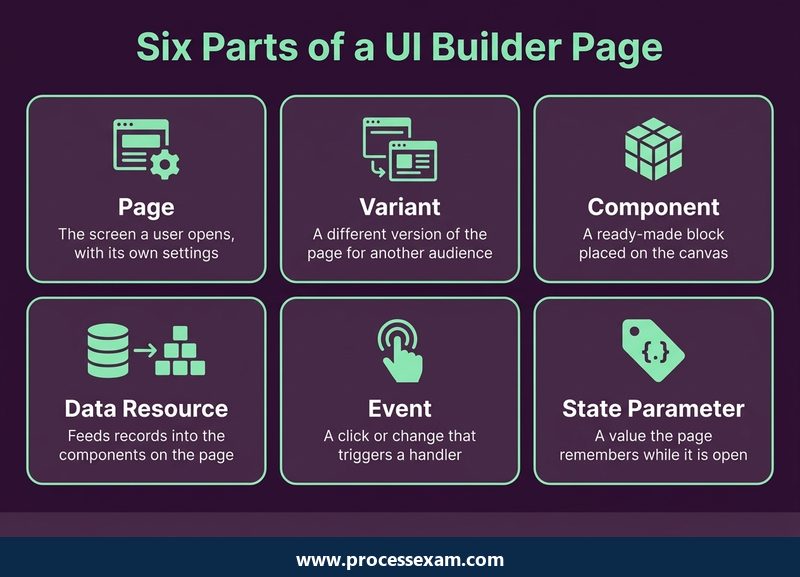
Expect orientation questions: what UI Builder produces, what the pieces of an experience are, and how a page relates to the experience that contains it. The blueprint's purpose statement mentions workspaces and custom portals, and its own sample question asks which experiences can be built within UI Builder, with workspace and custom portal as the correct answers. The lesson is to know the tool's scope. It builds experiences; it does not replace the app shell around them.
Page definitions, properties and settings (20%)
This is one of the two heaviest domains, so give it real lab time. Know what a page is, how you name and route to it, and where its properties and settings live. Practise creating a page, opening its properties, adding page parameters, and seeing how those parameters arrive when another page links to it. Questions in this territory tend to ask where a particular setting is configured or what a given property controls, which is a memory you only get from clicking through the screens.
Page variants and audiences (15%)
A variant is a different version of the same page, and an audience decides who sees which one. Build a base page, add a second variant for a different group of users, and then work out what a user outside both audiences would see. The exam-style thinking is about evaluation: when several variants could match, which wins, and what is the fallback. Practise predicting the outcome before you log in as the test user.
Web components (10%)
You need two layers here. The first is the library of Next Experience components you drag onto the canvas, and how their properties are configured. The second is custom web components built with the Next Experience UI Framework and brought into UI Builder when the library does not have what you need. For the exam, you are unlikely to be asked to write a full component; you should know that custom components exist, why a team would build one, and how they differ from configuring a ready-made one.
Data resources (15%)
Components need data, and data resources are how a page gets it. Work with a resource that looks up a record, one that looks up several records, and one that transforms or scripts a result. Then bind a component property to the output. Questions in this domain often describe a page that shows the wrong data, or nothing at all, and ask what is missing: a binding, a filter, a parameter that was never passed in. Debugging your own broken binding is the best revision there is.
Events, client state parameters and client scripts (20%)
The second 20% domain is about behaviour. An event is something that happens, such as a click, a selection or a page load. A handler decides what to do about it. A client state parameter is a value the page holds in the browser while the user is on it, and a client script is code that runs there when you need more than configuration can give. Practise a complete chain: a click raises an event, the handler updates a state parameter, and a component bound to that parameter changes. If you can narrate that chain from memory, most of the domain's questions become straightforward.
Styling and theming (10%)
The last domain covers how an experience looks, from styling an individual component to applying a theme across the whole experience. Learn which changes belong to one component and which belong at theme level, so that a company colour change is a single edit instead of fifty. These are often the quickest marks on the paper, provided you have tried the styling options once.
Which hands-on builds prepare you better than rereading notes?
Because the questions describe working pages, the best preparation is building a small set of them. You need a ServiceNow instance where you can create experiences, whether through your training environment or a personal developer instance from the ServiceNow developer programme, and a few evenings. Each build below targets one or two domains.
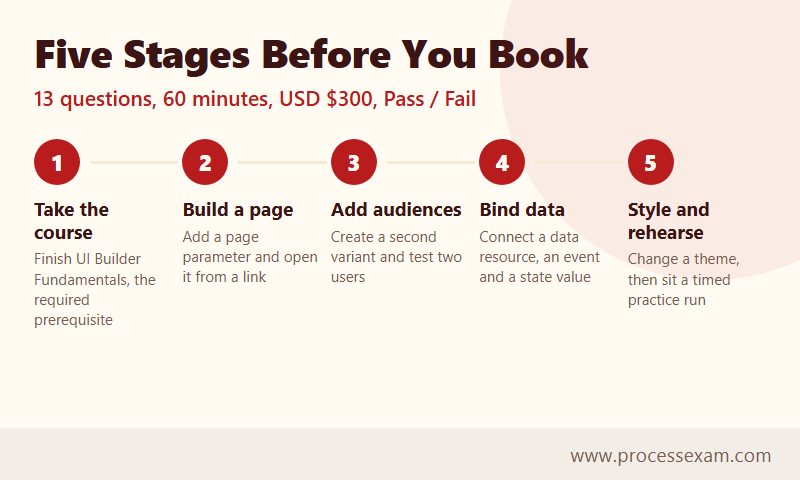
- A page with parameters. Create a page, give it a parameter, and open it from a link that passes a value. Covers page definitions and settings.
- A two-audience page. Add a second variant and an audience, then test with two users. Covers variants and audiences.
- A record list with a detail panel. Add a data resource that looks up records, bind a list component to it, and show details of the chosen row. Covers data resources and components.
- A page that remembers. Use a client state parameter to hold a filter chosen by a button or a drop-down, and bind it to the data resource. Covers events and client state.
- A small client script. Replace one configured behaviour with a short script, then compare which was simpler. Covers client scripts.
- A restyle. Apply one component-level style and one theme-level change, and note how far each reaches. Covers styling and theming.
After each build, write a two-line note in your own words: what you configured, and what you would have guessed wrong before building it. Those notes are your revision sheet, and they are far more memorable than a copied summary. When the six builds feel comfortable, a timed run through the SMC-UIB practice exam shows whether you can recognise the same ideas when they arrive as multiple-choice wording.
A simple order for the weeks before the exam
You do not need a long plan for a 13-question exam, but you do need an order. Finish UI Builder Fundamentals first. Then build items 1 and 2 above and read the page-level parts of the documentation. Move to data and events in the middle of your preparation, because they are the most connected and the most heavily weighted behaviour. Leave styling and web components for the end; they are easier to absorb once the rest of the page logic is familiar. In the last few days, redo any build that went badly rather than starting a new one.
How do you handle select-all questions under a 60-minute clock?
Sixty minutes for about thirteen questions is roughly four and a half minutes each. That is generous for a single-answer item and tight only if you stall. The real risk is the multiple-select format, where the question states how many responses to pick and partial credit is not given. One wrong tick, or one missed tick, loses the whole question.
A few habits help:
- Read the count first. If the question says choose two, you are looking for exactly two correct statements. Settle on the first, then look for the second.
- Judge each response on its own. Treat every option as true or false before comparing them, so a familiar-sounding wrong answer cannot hide next to a right one.
- Watch for scope words. Terms such as page, variant, experience or component change which setting is meant. Many wrong options are true statements about the wrong level.
- Do not use the clock as a reason to guess. With 60 minutes for so few items, you can afford to reread each scenario, and rereading is usually what turns a doubtful item into a clear one.
- Flag and return only if the exam allows it. Because the exam is non-proctored, check the interface rules shown at the start rather than assuming you can navigate back.
Since a fail returns no detail about the missed items, rehearsing question style before the real attempt matters more than it would on an exam that reports section scores. The sample question printed in the blueprint is the clearest example of the wording: a short question, four options, and an instruction that more than one may be correct.
Where does the badge help in day-to-day ServiceNow work?
A micro-certification is a narrow credential, and it is best presented that way. It tells a team lead or a client that you have passed a ServiceNow-set check on one tool, not that you can run a whole platform programme. That is still useful when a project is about workspaces or portals, because it answers the first question a hiring manager asks: has this person built in UI Builder, or only read about it?
It also changes your conversations with colleagues. After the builds above you will find it easier to explain why a page shows nothing, why two users see different layouts, or why a change to a single component did not carry across the experience. Those are everyday support questions for anyone who owns a workspace, and the credential is evidence you can answer them.
Because micro-certifications do not expire, a pass has lasting value, but keep one caveat in mind: ServiceNow says that if new requirements are added, you are expected to complete them to maintain the certification. Check the blueprint page occasionally, especially after a major platform release, so a change does not catch you out. For the next step in a developer path, many candidates pair this credential with broader application development learning; the blueprint's own recommended courses are the sensible starting point.
If you are still deciding whether to book, the test is simple. Can you build a page with a parameter, a variant, a data-bound list and a state-driven filter without looking anything up? If yes, the exam is a formality worth taking. If not, you know exactly which build to repeat first.
Frequently Asked Questions
What is the ServiceNow UI Builder micro-certification?
It is a ServiceNow micro-certification showing you can create and configure workspace and custom portal experiences in UI Builder, using Next Experience components and custom web components. It is open to ServiceNow customers, partners and employees, and passing it earns a credential that does not expire.
How many questions and how long is the UI Builder exam?
The exam has 13 questions and lasts 60 minutes, so you have roughly four and a half minutes per question. ServiceNow describes the question count as approximate. It is non-proctored and delivered directly in ServiceNow University, with single-answer and multiple-select questions.
How much does the UI Builder micro-certification cost?
The exam fee is listed at USD $300. ServiceNow's blueprint page does not print the fee itself, so confirm the amount when you register in ServiceNow University. You must complete the prerequisite UI Builder Fundamentals course before you can register for the exam.
What is the passing score for the UI Builder exam?
The result is Pass or Fail and appears immediately after you submit the exam. ServiceNow does not publish a passing percentage in the blueprint. Multiple-select questions give no partial credit, and a failed result does not reveal which items were missed or what the correct responses were.
Which UI Builder training do you need before the exam?
ServiceNow requires the on-demand UI Builder Fundamentals course. It also recommends ServiceNow Fundamentals, Scripting in ServiceNow Fundamentals, Application Development Fundamentals and Introduction to App Engine Studio for Developers, plus about six months of field experience with ServiceNow deployments and application development.
- ServiceNow UI Builder Test Questions |
- SMC-UIB Question Bank |
- SMC-UI Builder Simulator |
- SMC-UI Builder Mock Exam |
- ServiceNow UI Builder Book |
- UI Builder Certification Cost |
- UI Builder Certification Requirements |
- ServiceNow SMC-UI Builder Question Bank |
- ServiceNow SMC-UI Builder Book |
- ServiceNow SMC-UI Builder Study Guide |
- SMC-UI Builder Certification |
- SMC-UI Builder Certification Cost |
- SMC-UI Builder Certification Requirements |
- ServiceNow UI Builder Sample Questions |
- SMC-UIB Exam Questions Download |
- SMC-UIB Test Questions |
- UI Builder PDF |
- ServiceNow SMC-UI Builder Exam Questions |
- ServiceNow SMC-UI Builder Sample Questions |
- SMC-UI Builder |
- SMC-UI Builder PDF


