
ISTQB Mobile Application Testing (CT-MAT): Syllabus, Exam Format and How to Pass
Picture a mobile app that clears every case on the test bench and then freezes in a customer's hand, because a call arrived while the signal dropped from Wi-Fi to cellular. The ISTQB Certified Tester Mobile Application Testing (CT-MAT) certificate is built around that gap. Its paper has 40 multiple-choice questions, runs 60 minutes and needs 26 correct answers, and it expects you to hold the Foundation Level certificate first.

Why does an app that passes on the test bench still fail on a customer's phone?
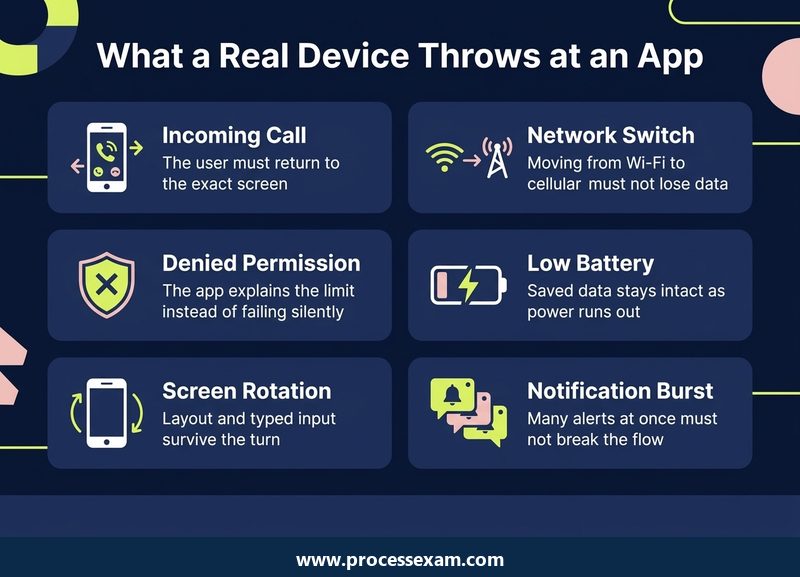
Because the bench rarely contains the things a pocket does to software. A phone changes networks while a form is half sent, rotates in the middle of typing, loses battery, asks the user for permissions that may be refused, and receives notifications that the operating system may delay or drop to save power. CT-MAT teaches you to plan tests around those conditions instead of treating the app as a desktop program with a smaller screen.
ISTQB's CT-MAT certification page describes it as an insight into the methods, techniques and tools a professional may use to test mobile applications, covering the project activities, roles, methods and methodologies. It is aimed at people who already work with mobile technology, people about to start mobile projects, and people in companies that plan to. Checked in October 2026, the exam is still listed there with the 2019 syllabus attached.
What does the certificate say you can do?
ISTQB lists seven business outcomes for a certified mobile application tester. In plain words, you should be able to:
- read business and technology drivers well enough to shape a test strategy;
- name the challenges, risks and expectations that come with a mobile app;
- apply the test types and levels that are specific to mobile apps;
- carry out the ordinary test-process activities in a mobile setting;
- choose suitable environments and tools; and
- understand the methods and tools that support mobile test automation.
Notice the verbs. Most of them ask you to apply or choose, and the syllabus marks eleven of its 47 learning objectives at the apply level (K3). That is why this paper rewards candidates who can picture a device in front of them, not only those who can recite definitions.
Who is it not for?
It is not a coding exam and it is not an automation-engineer certificate. The automation chapter is small, and you are asked to compare approaches and tools, not to write scripts. A tester who has only ever worked on desktop or server software can still pass, but should plan extra time for the vocabulary of sensors, interrupts and device labs.
How is the paper built, and what does a mark of 26 out of 40 demand?
The exam is multiple choice with 40 questions, 60 minutes on the clock and a total of 40 points, so each question is worth one point. The syllabus sets the pass line at 65 percent, which is 26 correct answers. Candidates taking it in a second language get 25 percent extra time under ISTQB's rule. The syllabus also says hands-on exercises are not examined, which means no lab work appears on the paper, although the exercises still teach the material.
| Item | Detail |
|---|---|
| Exam code | CT-MAT |
| Certification | ISTQB Certified Tester - Mobile Application Testing (CT-MAT) |
| Category | Specialist |
| Questions | 40 |
| Duration | 60 minutes (plus 25% for a non-native language) |
| Passing score | 26 / 40 |
| Exam fee | USD 199 |
| Prerequisite | ISTQB Certified Tester Foundation Level certificate |
| Syllabus version | Mobile Application Testing Foundation Level, version 2019 (v1.0) |
| Booking route | Pearson VUE is one listed provider; Member Boards also run exams |
One minute and thirty seconds per question sounds tight, but most items are short scenario or recall questions. A sensible habit is to answer the ones you recognise in under a minute and bank the saved time for the questions that combine two sections of the syllabus, which ISTQB says can happen.
Is this the current version of the exam?
Yes. In October 2026 the ISTQB page offers the Mobile Application Testing syllabus v1.0, dated 3 May 2019, together with Sample Exam A (questions and answers, version 1.3). I found no newer syllabus listed. The 2019 date matters for one reason only: the syllabus leans on the 2018 Foundation syllabus for the general test process, so your Foundation knowledge is assumed, not re-taught.
Do you have to attend a course?
No. The syllabus states that the exam may be taken as part of an accredited course or independently, and that completing a course is not a prerequisite. ISTQB does recommend accredited training because a Member Board has checked the material against the syllabus, but it also names self-study from the syllabus and recommended reading as a valid route. The one hard requirement is to hold the Foundation certificate before you book, and the syllabus overview lists the topics the paper draws on.
The fee above is the figure listed for this exam at USD 199. ISTQB's certification page itself shows no price, so confirm the final amount at the checkout of the provider you book through.
Which market facts, app types and architectures should shape a mobile test plan?
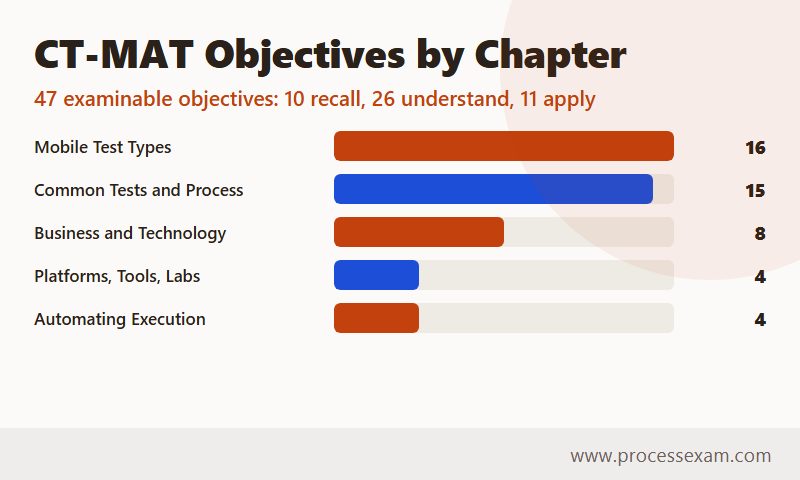
Chapter 1 is the strategy chapter, worth 175 of the syllabus's 775 recommended training minutes. It holds eight learning objectives: one at recall level, six at understand level and one at apply level. It is the least hands-on part of the syllabus, and it is the one most likely to be skimmed. Do not skim it, because its single K3 objective, applying the characteristics of the mobile market in preparing a test strategy, can produce a scenario question that needs everything else in the chapter.
How does analytics data choose the devices?
The syllabus asks you to treat analytics as test input. Relevant data includes downloads per platform, the spread of operating system versions, the market distribution of device types in a given region, screen sizes and resolutions, input methods and camera types. Sources named include StatCounter GlobalStats and the operating system vendors themselves. The device portfolio is then a compromise between market coverage, cost and risk, and the most important devices get the most testing.
A scenario might hand you a short list of devices with their share of a region's users, then ask which approach the team is using. The syllabus gives three:
- Single platform: one device type, one operating system version, one carrier and one network type.
- Multi-platform: a representative selection of devices and systems used by most customers in the target market.
- Maximum coverage: every version, device, manufacturer, carrier and network, which the syllabus calls basically exhaustive testing and usually not economically viable.
What separates native, web and hybrid apps?
A native app is built with a platform's own development kit, installed from a store and may need testing on every supported device. A browser-based app runs through a mobile browser; it needs no installability testing but does need browser compatibility testing. The syllabus lists four ways to build one: a mobile-specific site, a responsive design, an adaptive design and a progressive web app. A hybrid app wraps a web view in a native shell, so it reaches device features but can inherit performance problems from the wrapper and drift from the platform's look and feel.
Business models matter too, which surprises many candidates. Freemium, advertisement-based, transaction-based, fee-based and enterprise apps put pressure on different things. An ad-funded app must keep its banners from hiding essential controls, while a transaction-based wallet app makes payment and data integrity the first risks.
Which architecture words appear on the paper?
Expect thin and thick clients, single-tier and multi-tier servers, and three connection modes: never connected (a calculator), always connected (every mobile web app) and partially connected. Data can be synchronised continuously or in store-and-forward mode, and transferred synchronously or asynchronously. The test consequence is what examiners want: a store-and-forward app must be tested for what happens to saved data when the connection returns.
Which risks and mitigations pair up?
| Mobile-specific risk | Mitigation the syllabus names |
|---|---|
| Market fragmentation | Test the most commonly used devices |
| Cost of supporting several platforms | Analyse usage and drop platforms no longer in scope |
| New technologies, platforms and devices | Use pre-production versions |
| Devices not available for execution | Remote device access or crowd testing services |
| Usage while on the go | Field testing |
Learn this pairing as five short couples. A question that describes a team unable to buy a newly launched phone is asking for one of the right-hand cells, usually emulators for the early stage or a remote lab later.
What does Chapter 2 expect you to test on the hardware, the operating system and the network?
This is the heaviest chapter: 265 training minutes and 16 learning objectives, of which six are at the apply level. Every K3 objective in this chapter starts with the word prepare, so expect questions that describe a feature and ask which test to prepare or which one is missing. The chapter runs through three groups.
Hardware: what can a device change underneath the app?
The syllabus walks through nine hardware topics. The ones most likely to be asked as scenarios are these:
- Device features. It is not enough to test that an app works with the camera it expects. It must also survive a device with one camera, or none. The syllabus uses an app that supports front and rear cameras as the example.
- Displays. Check that interface elements scale to the current density and size, do not overlap, avoid touch problems and do not shrink images badly on high-density screens.
- Temperature. Devices throttle the processor, free memory and switch off parts of the system when they overheat. The test design is a long, uninterrupted, energy-hungry session, after which the software must show no unexpected behaviour.
- Sensors and input. GPS accuracy with the receiver switched on and off, fall-back to Wi-Fi, cell-tower or manual location, light conditions, sound inputs, soft keyboards from different makers, and a list of gestures from tap to pinch.
- Orientation. One rotation proves little. The syllabus says to switch several times, in different interface states, with and without data, and to confirm that the state and the typed input persist.
- Interrupts. Voice calls, messages, the charger being connected, low memory and app switching. The sneaky case is do-not-disturb mode being switched off after a long time, which releases many notifications at once.
- Permissions. Test denying at installation and granting afterwards, test that the app works with reduced permissions and explains what it needs, and check that it asks only for resources it actually uses.
- Power. Battery drain while active and in the background, plus data integrity at low and dead battery. These runs need to be planned, because they take hours and need log analysers.
Operating system interaction: what does the platform do to the app?
Here the chapter covers notifications (foreground and background, replies made from a notification that must be available later, and deep links that must open the right page instead of the home screen), quick-access links, and user preferences such as sound, brightness, power-saving mode, time zone and language. A short rule covers most of it: if the user sets a preference, the app must obey it. A phone on mute should not hear your app.
The same group contains the test conditions for each app type. Native apps need device compatibility and use of device features. Hybrid apps need checks of interaction with native features, wrapper performance and look and feel. Web apps need cross-browser checks, awareness of different JavaScript engines and use of operating system features such as date pickers. Multi-platform apps that share code need the shared part tested on each system, while apps that share no code are treated as two separate applications. Backward compatibility and newly introduced platform features, such as the Doze framework that the syllabus cites, round it out. Co-existence with other apps, such as a contacts or email app, is tested by risk, since nobody can test against millions of apps.
Connectivity: what happens when the network changes?
The syllabus lists cellular generations from 2G to 5G, Wi-Fi, NFC and Bluetooth, and three ways to test them. Emulators can simulate networks but have limited value. Building your own mobile network with bandwidth manipulation is very costly. Field testing is cheaper but hard to reproduce. Real users switch from Wi-Fi to cellular when they leave home, pass through dead spots and enter flight mode on purpose, so the three test conditions are: the app works in every mode, switching modes causes no data loss, and the user gets a clear message when functions are limited or bandwidth is low.
What do the common test types, extra levels and exploratory methods of Chapter 3 add?
Chapter 3 carries 200 minutes and 15 objectives, with four at apply level. It looks like a list of familiar test types, but each has a mobile twist that the paper tests.
Which familiar test types change on a phone?
| Test type | Mobile twist from the syllabus |
|---|---|
| Installability | Install, update and remove via stores, sideloading or a desktop tool; interrupt the process; reinstall with and without retained data; confirm no data is lost on update |
| Stress | Targets the device only: high CPU, out of memory, low disk space, battery stress, poor bandwidth, very many interactions; the Monkey tool can generate load |
| Security | Sensitive data on the device, unencrypted transfer or unsafe storage, injection and overflow inputs, deletion of temporary data after an abnormal end |
| Performance | Time the key workflows on the device and judge perceived speed, since users may remove a slow app within seconds |
| Usability | Findings are often findings, not defects, so you must explain them to the team; platform look and feel counts |
| Database | Synchronisation, upload conflicts, constraints, create-read-update-delete, search and data shared with other apps |
| Localisation | Long translated strings on small screens, and date and number formats |
| Accessibility | Use the device's own accessibility settings and the platform's published guidelines |
Two boundaries are worth remembering. Back-end stress and whole-system performance belong to other ISTQB syllabi, and the mobile syllabus refers to them instead of repeating them. Likewise, security is only introduced here, with the OWASP list of mobile vulnerabilities as a pointer. If a question describes a server-side load problem, it is probably testing whether you know this boundary.
What are field testing and store approval?
The syllabus adds levels beyond component to acceptance. Field testing checks the app in the conditions of real users: mobile towers, Wi-Fi and cellular switching, changing signal strength, blind spots, even routes and modes of transport scheduled for coverage. Application store approval is a checklist-based test against the platform's guidelines. A rejected submission means another round of waiting, so ISTQB advises running the same checks before handing the app to the store. Post-release testing means downloading and installing the live app from the store, which is the first moment the real distribution channel is exercised.
How do personas, mnemonics, tours and sessions fit together?
Experience-based testing gets its own section because mobile defects are often found by moving around. A persona is a fictional customer with habits and goals. A mnemonic is a memory aid where each letter stands for a focus; the syllabus gives SFiDPOT (structure, function, input, data, platform, operations, time) and the mobile-specific I SLICED UP FUN, which stands for inputs, store, location, interactions and interruptions, communication, ergonomics, data, usability, platform, function, user scenarios and network. Heuristics are rules of thumb. Tours explore the app from one point of view: Landmark, Supermodel, Sabotage, Feature, Scenario, Connectivity, Location, Light and Low battery appear in the syllabus's table, with further tours such as Gesture, Orientation and Motion drawn from a referenced book.
Session-based test management keeps this disciplined: a time-boxed session of setup, test design and execution, and issue investigation and reporting, driven by a charter. The syllabus notes that mobile apps often flip the test pyramid, with many manual tests, particularly at the field stage. Learn the table of tours with the subject each covers, because matching a tour to its subject is an easy question once you have seen the pairs.
How does the test process change?
The ordinary ISTQB test process still applies, with mobile additions at each stage. Planning must consider device combinations, emulators and simulators, and mobile-specific test types. Analysis and design add store approval, field testing, device compatibility and the kind of lab. Implementation and execution add field testing, post-release installability and experience-based techniques. Approaches vary by level: emulators can serve at component level, when a platform framework is needed, and at system level when devices are not available.
How do emulators, simulators, labs and automation fit into the last two chapters?
Chapters 4 and 5 are short, 80 and 55 minutes with four objectives each, yet together they hold eight of the 47 objectives and they are comparatively easy marks. They contain definitions that candidates mix up, so a precise reading pays off.
What is the difference between an emulator and a simulator?
The syllabus is firm that the two words are not interchangeable. A simulator models the runtime environment, and apps tested on it are compiled into a dedicated version that works in the simulator but not on a real device. An emulator models the hardware and uses the same runtime environment as the physical device, so its apps are compiled into the actual byte-code the device would run.
| Simulator | Emulator | Real device | |
|---|---|---|---|
| What it models | The runtime environment | The hardware, with the real runtime | Nothing; it is the product's home |
| Build tested | A dedicated build that differs at byte-code level | The same byte-code as the shipped app | The shipped app |
| Best use | Early development, quick deployment | Early development and cheaper environments | Late-stage regression and sensor-heavy tests |
| Known limit | Weaker than an emulator as a device substitute | May behave differently; multi-touch and accelerometer may be missing | Cost and availability |
Both tools let you set network speed, signal strength and packet loss, change orientation, generate interrupts and feed in GPS locations that would be costly to reproduce physically. Android Debug Bridge, Xcode and Android Studio are named as ways of reaching them. The recurring exam point is that an emulator cannot fully replace a device.
How do you choose between an on-premise and a remote lab?
An on-premise lab holds devices, emulators and simulators on site. It suits proximity-based and sensor-specific tests such as battery, touch and security, but needs a large budget and ongoing maintenance. A remote lab gives access to devices in a provider's data centre. It helps when devices or networks are not physically available, can grow and shrink with the project and is cost-effective for occasional use. Its weak points are slow responsiveness, limited multi-touch and gesture options, and hard-to-test sensors such as NFC, Bluetooth and battery consumption. Many teams combine both.
What does the automation chapter ask?
Two approaches are named: user-agent based testing, which spoofs a browser on a given device and works for mobile web, and device-based testing, which runs the app on the device and works for every app type. Object identification, image comparison and text recognition are the script-creation methods. The syllabus compares them on reliability, speed and maintenance: object identification is usually faster, but a hidden object can be clicked in code while invisible to the user, which risks false negatives; image comparison follows what the user sees but fails when the layout changes and costs effort in updating baseline images.
Tool evaluation splits into organisational fit and technical fit. Technical parameters include new features such as biometric login and chatbots, varying network conditions, test data, reporting, running at scale and integration with other tools. For the lab question in 5.4, the syllabus suggests devices beside emulators early on, a remote lab when full regression and non-functional tests begin, and states that a well-kept on-premise lab can be as good as any remote one.
In what order should you study when you have never run a device lab?
Start with what you already know. The syllabus builds on the 2018 Foundation syllabus for the test process, risk analysis and automation concepts, so a quick pass through your Foundation notes is the cheapest first step. Then follow the weight of the material, not its page order.
| Stage | Material | What to do |
|---|---|---|
| 1 | Foundation refresh | Re-read test process and risk-based testing; they frame Chapters 1 and 3 |
| 2 | Chapter 2 (265 min) | Make one flash card per test condition; for each, write the failure it catches |
| 3 | Chapter 3 (200 min) | Memorise the tour table and the two mnemonics, then the test-type table |
| 4 | Chapter 1 (175 min) | Practise the three device-selection approaches and the risk pairs |
| 5 | Chapters 4 and 5 (135 min) | Write your own emulator versus simulator comparison without notes |
| 6 | Timed paper | Run a 40-question set in 60 minutes and tally misses by chapter |
Hands-on work is not examined, but a few exercises from the syllabus will make the scenarios vivid. Rotate a phone five times while a form is half filled. Deny a permission at installation, then grant it later. Switch to flight mode during an upload. Create an emulated device in Android Studio or Xcode, install a build and change its network speed. None of this needs a lab, and an hour of it fixes the vocabulary better than a day of reading.
How should you use ISTQB's sample paper?
ISTQB publishes Sample Exam A with a separate answer file. Treat it as a measuring device, not a study text: sit it under timed conditions once you have finished stage five, then sort every miss by chapter. A wrong answer in Chapter 2 usually means you remembered the test but not its purpose. A wrong answer in Chapter 1 usually means you confused two strategy options.
After the sample paper, a CT-MAT practice exam from ProcessExam is useful for rehearsing the 40-question, 60-minute rhythm several more times, because a single sample paper gives you only one reading of your pace. Aim to clear 26 comfortably, say with around 30 right on timed runs, before you book.
What are the habits that waste marks here?
Three come up often. First, reading emulator and simulator as one word. Second, answering a connectivity question with a test for one mode when the question is about switching between modes. Third, choosing the most thorough option when the scenario describes a small team with a limited budget; the syllabus warns that exhaustive coverage is rarely viable, so the right answer is usually the one that prioritises by market data and risk.
Where does CT-MAT sit among ISTQB certificates, and what does it add to a tester's profile?
CT-MAT is a Specialist certificate in the Foundation-level stream, which is why the Foundation certificate comes first and why the paper is shorter than an advanced exam. ISTQB's page notes that holders may go on to other Core, Agile or Specialist stream certifications. It does not claim to lead to a fixed ladder, so choose the next step by the work you do.
What the credential shows an employer is specific. It says you know why device fragmentation drives a test portfolio, can design interrupt, permission and connectivity tests, understand the limits of emulators, and can argue for a lab and tooling choice. Those are the questions a mobile project actually asks in planning. If you are moving from web testing into mobile, the certificate gives you the shared vocabulary quickly. If you already test apps, it turns habits into named techniques, such as tours and session-based management, that you can defend in a review.
Which related ISTQB syllabi does this one point to?
The mobile syllabus refers outward in several places: to the Performance Testing syllabus for back-end load, to the Security specialist syllabus for deeper security work, to the usability syllabus for usability, and to the Test Automation Engineer syllabus for automation framework design. You do not need those for the CT-MAT paper, but they are the natural reading if one chapter becomes the centre of your job. For the syllabus itself, ISTQB lists the CT-MAT syllabus v1.0 PDF for download on its certification page.
Frequently Asked Questions
How many questions and how much time does the CT-MAT exam give you?
The CT-MAT exam has 40 multiple-choice questions and runs 60 minutes. You need 26 correct answers, which is 65 percent, and each question is worth one point. ISTQB adds 25 percent more time for candidates who take the paper in a language that is not their first, so plan about 90 seconds per question.
What must you hold before you can take the CT-MAT exam?
You must hold the ISTQB Certified Tester Foundation Level certificate before taking CT-MAT. The syllabus does not make an accredited training course compulsory, so you can prepare through self-study if you prefer. Check with the Member Board or exam provider you book through for any extra local conditions.
How much does the CT-MAT exam cost?
The CT-MAT exam fee is listed at USD 199. ISTQB's own certification page shows no price, because exams are booked through Member Boards and exam providers such as Pearson VUE. Check the amount at the checkout of the provider you choose, since local taxes and provider terms can change what you pay.
Is CT-MAT a hands-on exam, or only multiple choice?
It is multiple choice only. The syllabus contains hands-on exercises, such as testing orientation changes or permissions on a device, but states that hands-on objectives and exercises are not examined. They still help, because many questions are scenarios that describe what a phone does and ask which test you would prepare.
Which version of the CT-MAT syllabus is current?
In October 2026 ISTQB lists the Mobile Application Testing Foundation Level syllabus v1.0, dated 3 May 2019, together with Sample Exam A questions and answers, version 1.3. The exam is based on that syllabus. It has five chapters covering business drivers, mobile test types, common test types, platforms and tools, and automation.
- Specialist |
- ISTQB Mobile Application Testing Test Questions |
- CT-MAT Question Bank |
- ISTQB Mobile Application Testing Book |
- Mobile Application Testing Certification Cost |
- Mobile Application Testing Certification Requirements |
- ISTQB Mobile Application Testing Sample Questions |
- CT-MAT Exam Questions Download |
- CT-MAT Test Questions |
- Mobile Application Testing PDF |
- CT - Mobile Application Testing Mock Exam |
- CT - Mobile Application Testing Simulator |
- CT - Mobile Application Testing Certification |
- CT - Mobile Application Testing Certification Cost |
- CT - Mobile Application Testing Certification Requirements |
- ISTQB CT - Mobile Application Testing Book |
- ISTQB CT - Mobile Application Testing Question Bank |
- ISTQB CT - Mobile Application Testing Study Guide |
- CT - Mobile Application Testing |
- CT - Mobile Application Testing PDF |
- ISTQB CT - Mobile Application Testing Exam Questions |
- ISTQB CT - Mobile Application Testing Sample Questions


